Stale Tickets
A section in the inbox listing tickets where the agent is waiting on the customer to reply and the customer hasn't replied for a while. It's the inverse of "what should I work on next" - it's "what should I follow up on."
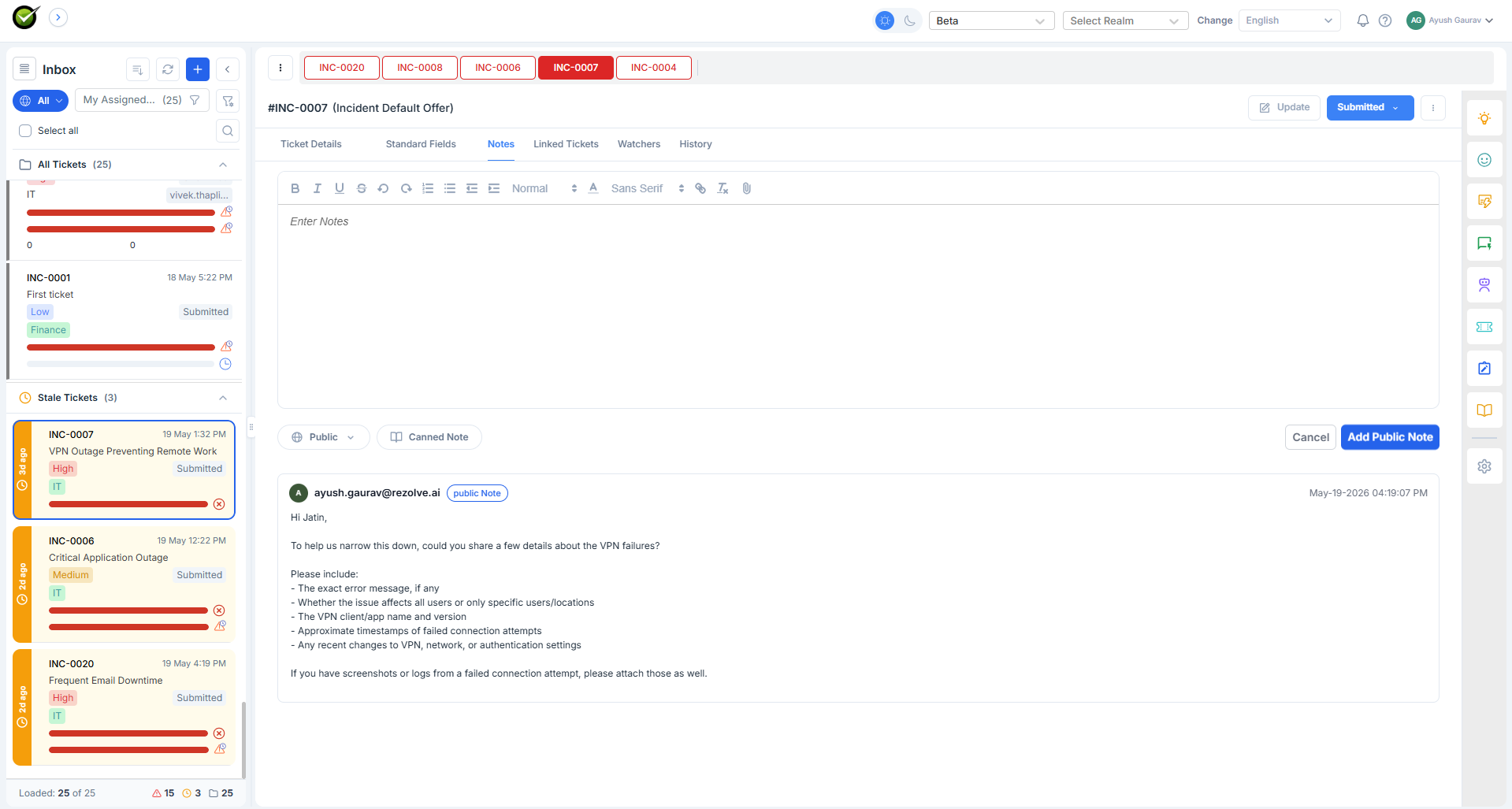
What the agent sees
A dedicated section in the inbox listing tickets that match these rules:
- The most recent note is from the agent (not the customer).
- That note is more than X hours / days old.
The threshold X is configurable per agent - junior agents may want a 4-hour reminder; an enterprise account manager may set a week.
Each card shows the ticket ID, subject, when the agent last replied, and who the ticket is with. The agent can open a stale ticket and decide whether to nudge the customer, close it, or leave it.
What it reads
Just the ticket - last updated time and notes (specifically, who sent the last response).
What it doesn't do
Stale Tickets is a list, not an action. It doesn't auto-close anything, doesn't email the customer, and doesn't change the ticket's state. The agent decides what to do.
For the opposite case - when the customer has replied and the agent hasn't - see Proactive Status Update. That one nudges the agent to reply with a generic update.
Setting the threshold
The Stale Tickets threshold lives in the agent's personal settings, not the tenant config. Each agent picks a value that matches their queue. The default is 48 hours.