Configuration
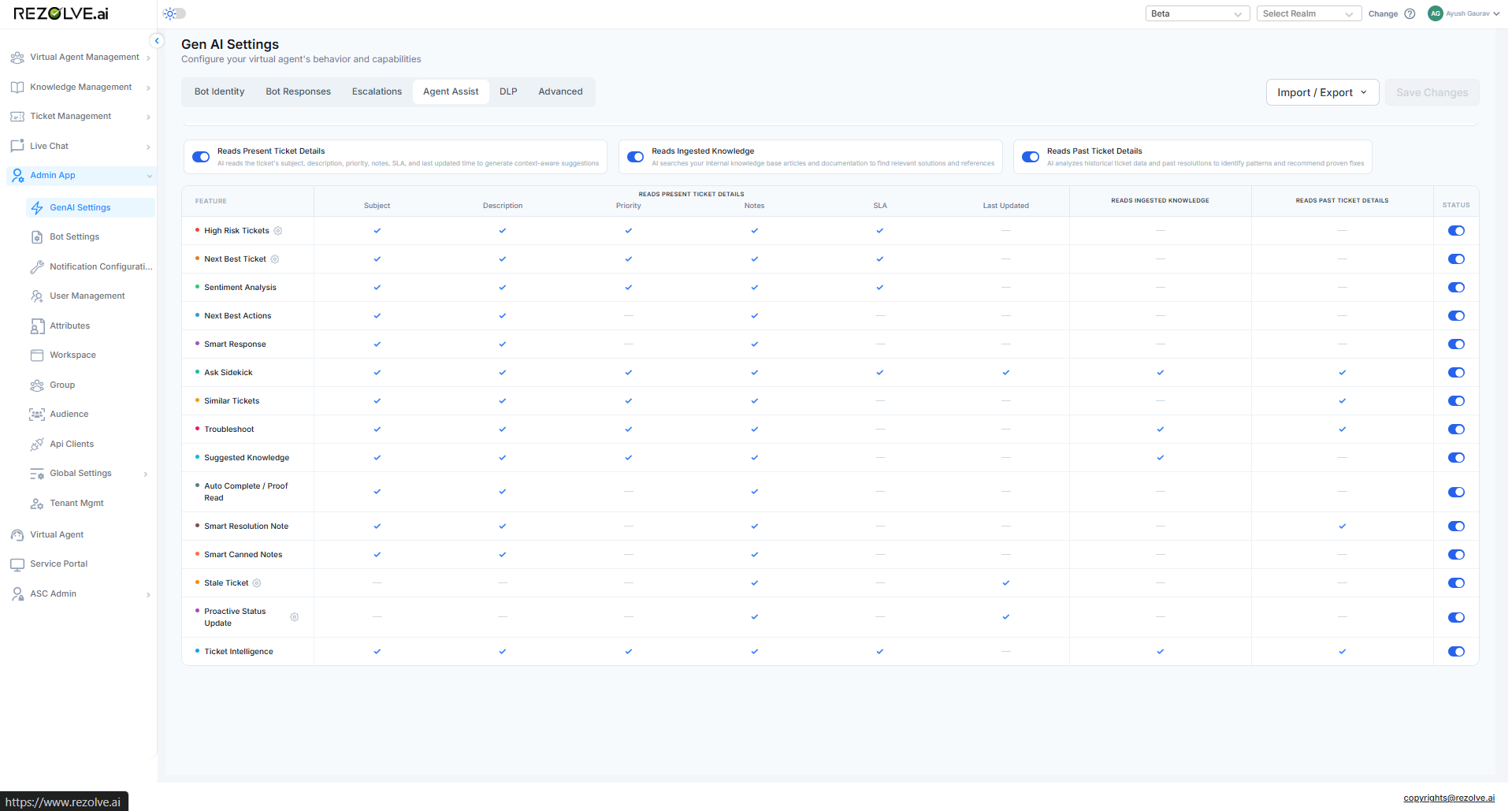
Agent Assist is configured in one place - GenAI Settings → Agent Assist. A tenant admin decides which features are on, which data sources the AI can read, and how the risk score is tuned.
Where it lives
Open GenAI Settings (gear icon → GenAI), then the Agent Assist tab. Everything below is on this one page.
Turning features on and off
Each of the 11 Agent Assist features has its own toggle. Off means the panel doesn't render for any agent in the tenant. Turning features off one at a time is the usual way to roll out a phased pilot - start with Sentiment and Suggested Knowledge, let agents get used to those, then add the more invasive ones.
What data the AI can read
Three checkboxes:
- Ticket details - subject, description, notes, priority, SLA. Always on.
- Past tickets - historical tickets in the tenant. Drives Next Best Actions, Smart Response, Ask Sidekick, Similar Tickets, Troubleshoot.
- Ingested knowledge - articles ingested into the knowledge base. Drives Next Best Actions, Smart Response, Ask Sidekick, Troubleshoot, Suggested Knowledge.
Turn one of these off and any feature that depends on it is greyed out in the feature list - the admin can see clearly which features would stop working before they flip the switch.
Risk score configuration
This section drives High Risk Tickets and Next Best Ticket - both use the same scoring engine.
Thresholds
Two numbers, editable:
- At Risk - score ≥ this value renders the red label. Default: 60.
- Monitor - score ≥ this value renders the yellow label. Default: 45.
Signal weights
A table of the signals that add to the score. Each row is editable:
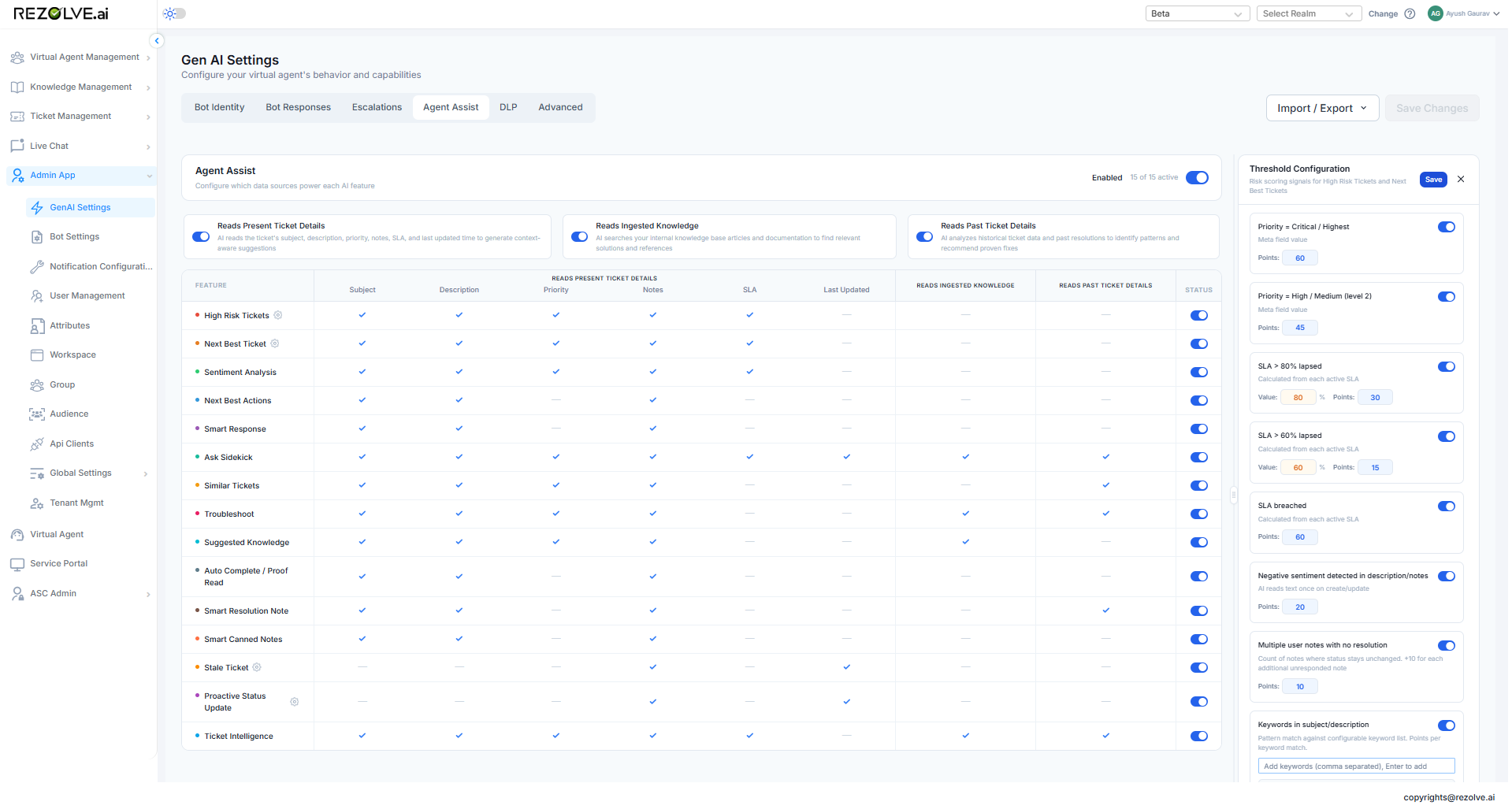
| Signal | Default points |
|---|---|
| Priority is critical or highest | +30 |
| Priority is high or medium | +15 |
| SLA over 80% lapsed | +30 |
| SLA over 60% lapsed | +15 |
| SLA breached | +60 |
| Negative sentiment in description or notes | +20 |
| Multiple unanswered user notes | +10 per additional note |
| Requestor in VIP group / queue | +10 |
Tenants that handle a lot of CXO tickets often raise the VIP signal to +30; tenants with strict SLAs raise the breach signal to +90.
Keyword list
A free-text editor for the keyword list used by the keyword-match signal. Each keyword gets +10 by default, but the points-per-keyword are also editable. The defaults are urgent, escalate, CEO, legal. Add or remove as needed.
Custom-field rules
A custom-field rule maps a value or pattern on a custom field to a score. Example: a custom-field rule on escalation_request = true adds +40. Useful for tenants whose risk model needs more than the built-in signals can express.
Per-feature settings
A few features have their own settings beyond the main toggles:
| Feature | Setting |
|---|---|
| Stale Tickets | Threshold (hours / days) - set per agent in personal settings, not here |
| Proactive Status Update | N hours - tenant-level, set here |
Changes take effect
Most changes apply on the next ticket update (the next time a ticket re-scores or a panel refreshes). Risk-score threshold changes are immediate - the labels recompute across all open tickets on save.