Sentiment
A panel that reads the ticket description and all the notes and tells the agent how the customer is feeling. The agent uses it to adjust tone and urgency before they reply - a ticket with 85% satisfaction gets a different response than one with 88% urgency and 35% anger.
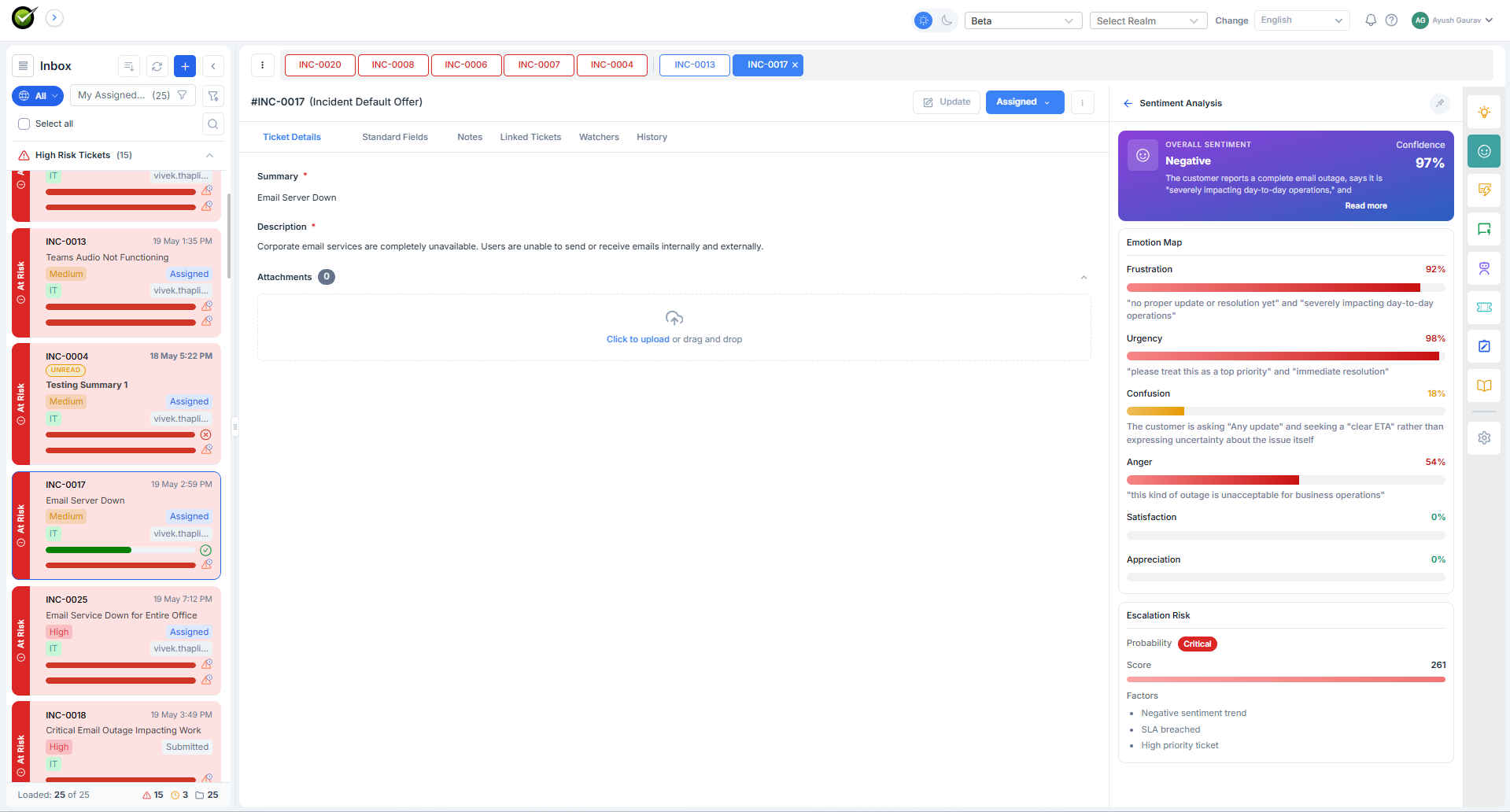
What the agent sees
Two things, stacked.
The banner, at the top of the panel: an overall label (Negative, Neutral, Positive), a confidence percentage, and a one-line data-source note (e.g. "Across description & 3 notes") so the agent knows what was read.
The emotion map, below the banner: a horizontal bar chart with six emotions. Each row has the emotion name, a percentage, a coloured bar (red for negative emotions, yellow for mixed, green for positive), and a one-line explanation grounded in the ticket text - e.g. "Repeated crashes causing data loss and work disruption."
The six emotions are fixed:
- Frustration
- Urgency
- Confusion
- Anger
- Satisfaction
- Appreciation
When it refreshes
On every new public note - whether the agent or the user wrote it. Private notes don't trigger a refresh (they don't change what the customer feels).
What it doesn't do
Sentiment is read-only. It doesn't email the customer, escalate the ticket, or change priority. It's a panel for the agent's eyes. The agent decides what to do with it.