Smart Resolution Notes
When a ticket moves to its first closed-state status, the system reads the case in full and drafts a structured closure note for the agent to review. The agent's shorthand work-log notes are the primary input; the system refines them using ITSM-domain priors (abbreviations, severity codes, CI naming conventions) so the final note is consistent, searchable, and useful to the next agent who hits a similar issue.
The original shorthand notes are preserved in the work-log history for audit. The refined note is the new resolution record.
When it fires
The trigger is the same for every ticket type: the ticket moves to the first closed-state status in its workflow (typically Resolved). For Incidents that's the Resolution Note drawer. For Problem, Major Incident, and Change tickets the same trigger opens a type-specific template - covered under Behaviour by ticket type.
What the system reads
Every available signal on the case:
- Subject and description
- Attachments
- Comments - public, private, and chase
- Work notes - shorthand and structured
- Linked knowledge articles
- Related case IDs
The breadth matters - shorthand work notes on their own are often too thin to publish; in combination with the rest of the case, the system has enough to draft something useful.
The default resolution note (Incident)
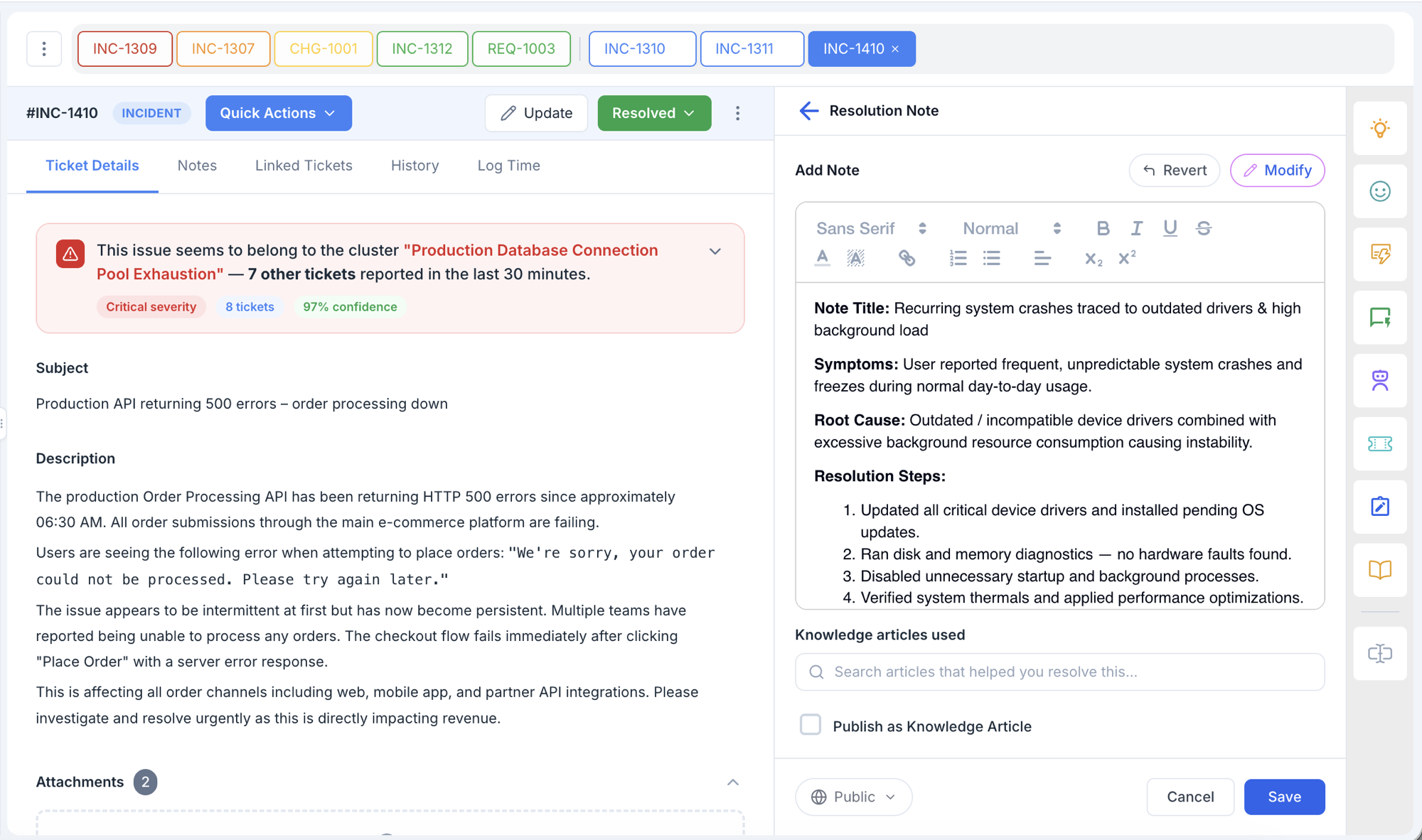
For Incident tickets, the system generates a resolution note structured across seven fields:
| Field | Purpose | Guidance |
|---|---|---|
| Note Title | Crisp problem summary | Max 100 characters, searchable keywords |
| Symptoms | Observable indicators | What the user reported or experienced |
| Root Cause | Underlying issue | If identifiable; "Undetermined" is acceptable |
| Resolution Steps | What worked, in sequence | Numbered, actionable steps |
| Attempted Remedies | What didn't work | Helps future agents avoid dead ends |
| Applicability | Ticket types this helps | Domain - Category - Subcategory, plus keywords for retrieval |
| Confidence Level | The system's self-assessment | High / Medium / Low based on data clarity |
What's excluded
The system is instructed to omit the following from the generated note, even when it appears in the source material:
- PII from the requester - names, contact details, employee IDs
- Credentials or sensitive data that may have been pasted into comments
- Internal escalation politics or tone issues that appear in private notes
These stay on the ticket itself (private notes are still part of the work log); they just don't propagate into the resolution record.
Knowledge articles used
Below the note, the agent can search the knowledge base for any articles that helped them resolve the ticket and attach them. These show up on the published note as references and feed the system's similarity engine for future tickets.
Publish as Knowledge Article
A checkbox on the resolution screen offers to publish the resolution note as a knowledge article. The default state varies by ticket type (see the table below). On an Incident, the default is off; the agent opts in when the note is genuinely reusable.
Behaviour by ticket type
The default flow above applies to Incident tickets. For Problem, Major Incident, and Change tickets, the system generates a type-specific article with its own template and publish behaviour. The trigger is the same in every case; only the template and the publish behaviour branch.
| Ticket type | Article generated | Saved as knowledge article | Sub-type selection |
|---|---|---|---|
| Incident | Resolution Note (template above) | Optional - checkbox on the resolution screen | n/a |
| Problem | Known Errors Article (KEDB) | Always - auto-published to KEDB and KB on resolve | Agent picks KEDB - Solutions or KEDB - Workaround |
| Major Incident | Known Errors Article (KEDB) | Always - auto-published to KEDB and KB on resolve | Agent picks KEDB - Solutions or KEDB - Workaround |
| Change | Post-Implementation Review (PIR) | Optional - checkbox on the resolution screen (default state set by the LLM's Knowledge-Worthy score) | n/a |
KEDB for Problem and Major Incident tickets
When a Problem or Major Incident ticket is moved to resolved, the system generates a Known Errors Article instead of a generic resolution note. The article is always saved to the Known Error Database and the broader knowledge base, tagged either KEDB - Workaround or KEDB - Solution.
On the resolution screen, the agent picks one of:
- KEDB - Solutions - a permanent fix has been identified and applied. The Permanent Solution field is required.
- KEDB - Workaround - only a temporary workaround exists; root cause investigation is still open or a permanent fix is pending. The Workaround field is required; Root Cause may be left as "Under investigation."
A KEDB entry that lands as a Workaround can be re-tagged as a Solution later when the permanent fix ships. See Known Error Database for the lifecycle.
PIR for Change tickets
When a Change ticket is moved to resolved (implementation complete), the system generates a Post-Implementation Review article. The PIR is always generated and attached to the Change ticket; publishing it as a knowledge article is optional, and the default state of the publish checkbox is set by the LLM's Knowledge-Worthy score - changes that look reusable as templates (a routine package upgrade, a standard config rollout) default the checkbox on; one-off operational changes default it off.
The agent review step
The generated note is a draft, not a finalised record. The agent reviews each field, edits as needed, and clicks Save. The drawer offers:
- Modify - re-prompt the system with feedback to regenerate
- Revert - throw away the current draft and start from the source again
After save, the resolution note becomes the ticket's resolution record. The original shorthand work notes stay in the work-log history; they are not overwritten.
What Smart Resolution Notes does not do
- It does not move the ticket through workflow. The agent still drives the status transition; the note is generated alongside.
- It does not auto-publish Incident or Change notes to the knowledge base. Both default to opt-in (with the Knowledge-Worthy score nudging the Change default).
- It does not invent fields. If the case doesn't contain enough signal for, say, Root Cause, the system flags it as undetermined rather than guessing.
Related topics
- Known Error Database - where KEDB articles land
- Problem and Major Incident Detection
- Change Risk Advisory
- Configuration