Ticket History
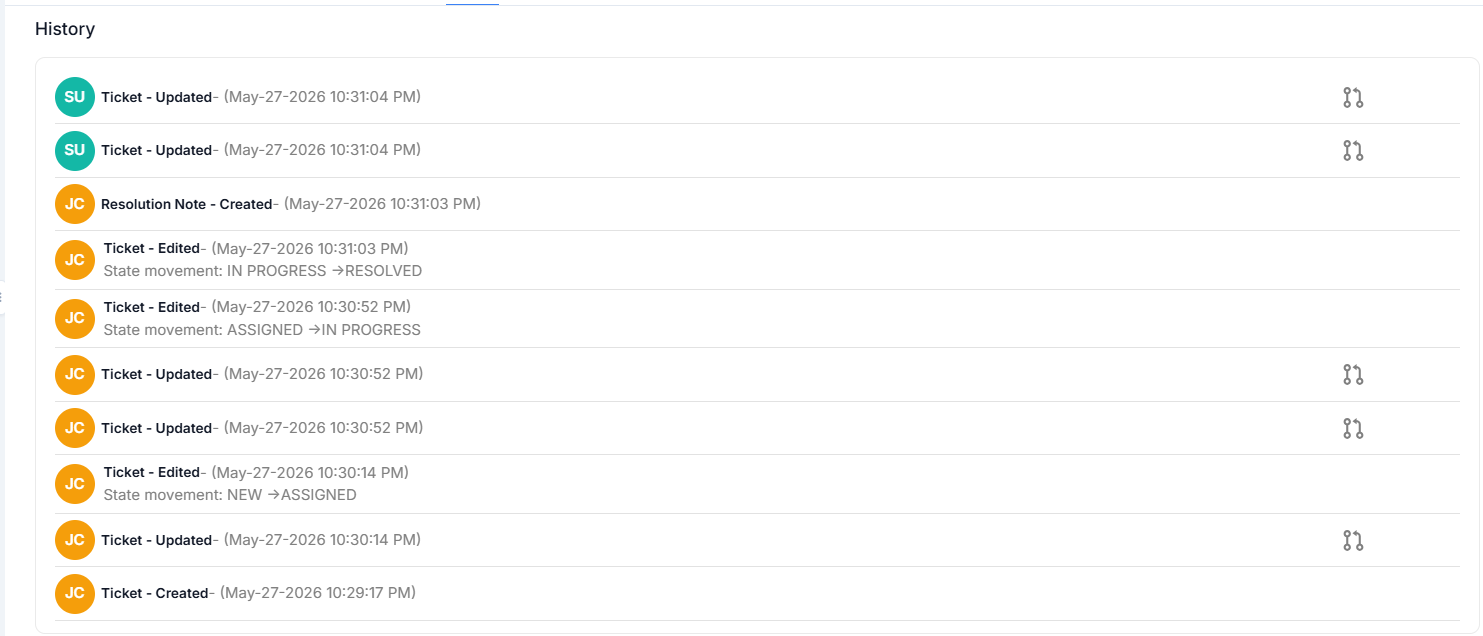
The View History feature provides a chronological log of all changes and actions taken on a ticket. This includes:
- Ticket creation and modification timestamps
- Agent assignments and state transitions
- Notes added (both public and private)
- Any changes in priority, category, or attachments
This feature ensures transparency and accountability by keeping a detailed audit trail.
Benefits of Ticket History
- Accountability: Track who made what changes and when
- Troubleshooting: Identify when issues began or escalated
- Compliance: Maintain records for audit and regulatory requirements
- Training: Review historical tickets to improve support processes
- Communication: Understand the full context of a ticket's lifecycle
Accessing Ticket History
- Open the desired ticket
- Look for the "History" or "Activity Log" tab
- View the chronological list of all actions and changes
History Entry Types
The ticket history tracks various types of changes including:
- Status Changes: When a ticket moves between states (e.g., Open → In Progress → Resolved)
- Assignment Changes: When a ticket is assigned or reassigned
- Field Updates: Changes to any ticket fields (priority, category, due date)
- Note Additions: When public or private notes are added
- Attachment Actions: When files are added or removed
- Watcher Changes: When users are added or removed as watchers