Sharing
You've built an agent or an app. Now you want to put it in front of someone — a teammate, a customer, the whole internet. There are two paths: public chat URLs and embedded chat.
Public chat URLs
Every agent and app can be exposed as a chat at a public URL.
Open the agent (or app), flip Public on, and pick a slug. The agent is now reachable at:
https://your-domain.com/t/{your-tenant}/chat/{slug}
Or for an app:
https://your-domain.com/t/{your-tenant}/chat/app/{slug}
Anyone with the URL can chat with the agent. No login required by default.
Customising the public chat
The chat page picks up:
- The agent's name as the page title
- The agent's purpose as a description
- An avatar if you've uploaded one
- A welcome message you can configure on the agent
You can also brand the page with your tenant's logo and colours under Settings → Team.
Restricting access
A public URL is fully public by default. To restrict:
- Require sign-in — toggle on, and only authenticated users from your tenant can chat
- Whitelist domains — only emails from specific domains can sign in
- OAuth gate — require an OAuth flow before the chat opens (useful for SSO-protected agents)
Embedded chat
Drop the chat widget into your own website. Copy the embed snippet from the agent's Sharing page, paste it into your HTML, and the widget appears wherever you placed it.
The widget supports:
- Floating button (opens a chat panel)
- Inline mode (fills a div)
- Custom colours and position
Same backend as the public URL. Same conversation, same agent.
Deploy to Microsoft Teams or Slack
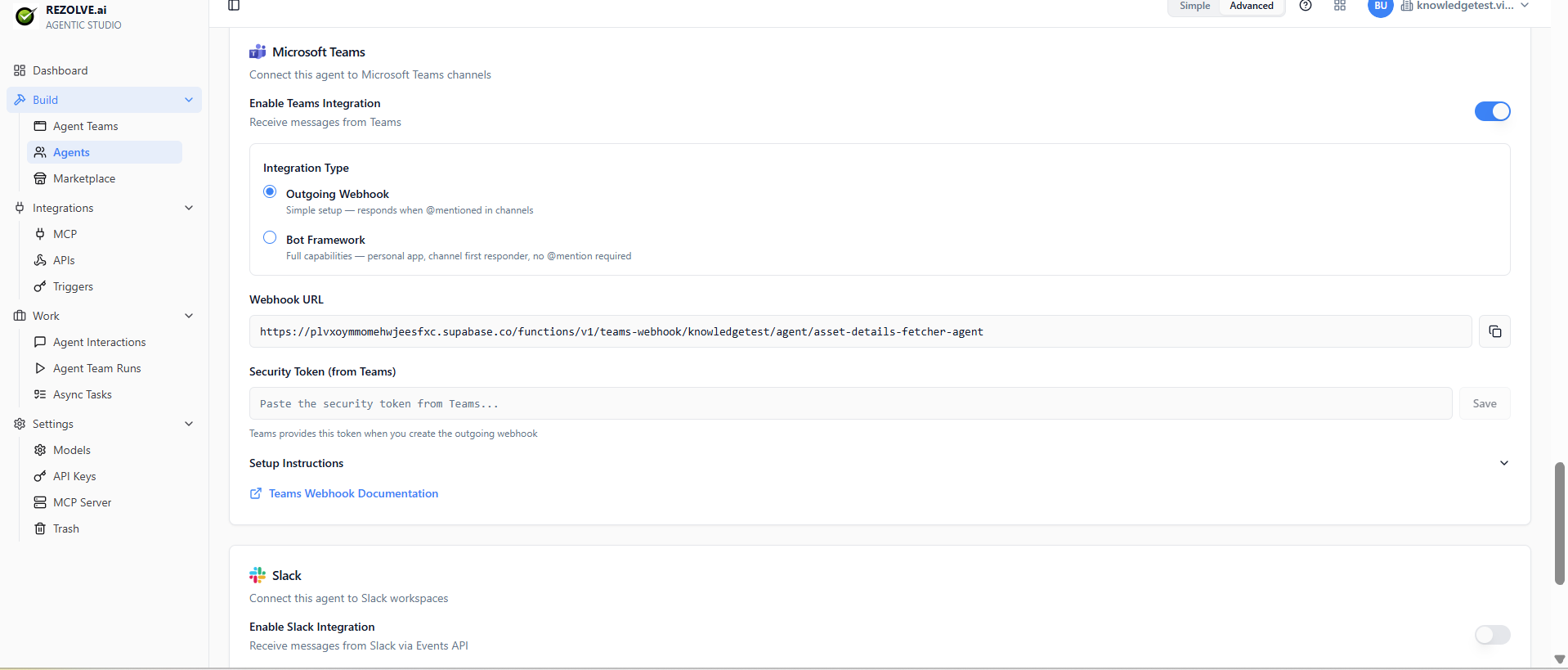
For an agent that should respond inside a Teams channel or a Slack workspace, use the agent's chat-platform integration instead of a public URL. Toggle Enable Teams Integration or Enable Slack Integration on the agent, pick the integration type (Outgoing Webhook for the simple setup, or Bot Framework for the full personal-app experience), copy the generated webhook URL into your Teams / Slack admin, and paste the security token back into Agent Studio.
Conversation persistence
By default, each visitor gets a fresh conversation each time. To make conversations persist (so a returning user picks up where they left off), turn on Remember conversations on the agent. The chat uses a browser session token to identify returning users.
For authenticated chats, conversations persist by user account.
Rate limiting
Public chats have rate limits to protect against abuse:
- Per-IP request rate
- Per-conversation token cap
- Per-tenant daily ceiling
Configure these under Settings → Team if your defaults aren't strict enough or are too strict.
Taking it offline
Toggle Public off. The URL stops responding. Conversations stop. Re-enabling restores the same URL.
If you need to break existing share links permanently, change the slug — old URLs 404.