Marketplace
The marketplace is a catalogue of pre-built agents and apps you can install with one click and adapt to your needs.
Why use it
Building an agent from scratch means writing instructions, choosing tools, testing, iterating. The marketplace skips most of that for common use cases — Compound Review Agent, Customer Support Bot, Standup Summariser, etc.
Install one, look at how it's wired, change what doesn't fit. Often faster than starting blank.
Browsing
Open Build → Marketplace. You'll see cards for each available agent or agent team, with:
- Name and one-line description
- Type badge (Agent / Agent Team / AI Function)
- Author / source and version
- A Your component marker on anything published from your own tenant
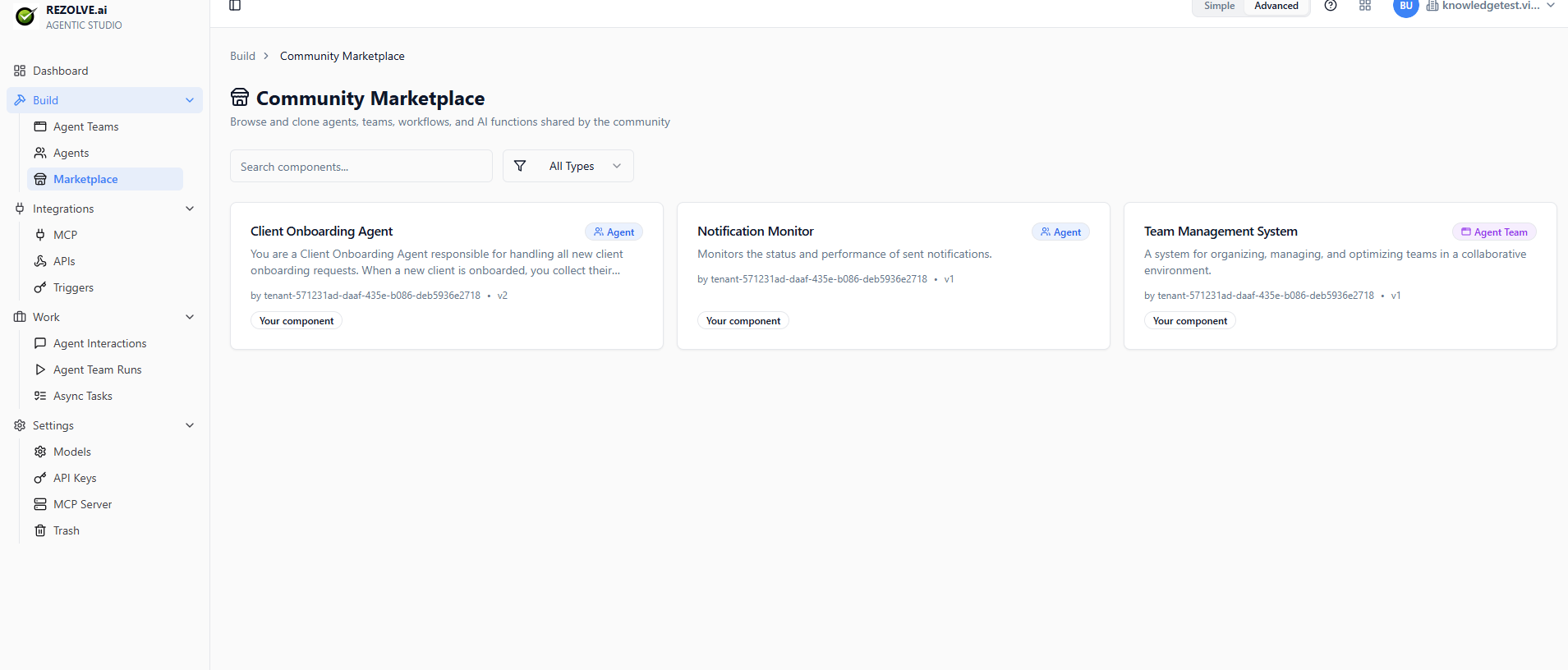
Click into any card for the full description.
Installing
Click Install. The agent or app is cloned into your tenant under your account. You're now editing your own copy — changes you make don't affect the original.
The clone keeps the same tools and instructions. If a tool needs credentials (an API key, an OAuth connection), you'll need to configure those before the agent runs.
Adapting
Most installs need at least these tweaks:
- Change the name to something specific to your team
- Adjust the instructions for your tone, your products, your policies
- Re-attach tools if the marketplace template references tools you don't have
Test in the sandbox before publishing or sharing.
Sharing your own templates
If you've built something useful, it can become a marketplace entry. Talk to your tenant admin about contributing — the process is curated to keep quality high.