Getting Started
The fastest way in: build an agent, test it, share a chat link. Should take about five minutes.
1. Sign in
Sign in with your work / SSO account.
2. Pick a model
Go to Settings → Models and confirm at least one LLM model is configured. Most tenants come pre-configured; if yours doesn't, paste in an API key for the provider you want to use (Claude, GPT, Gemini, or another supported model).
You can change the model an agent uses any time. Start with whichever model your team already pays for.
3. Build your first agent
Click Build → Agents → New Agent.
You'll need three things:
- Name — what your team will call this agent
- Purpose — one sentence describing what it does (the model uses this to know its scope)
- Instructions — a longer prompt telling it how to behave, what to say, what not to do
Save. The agent now exists.
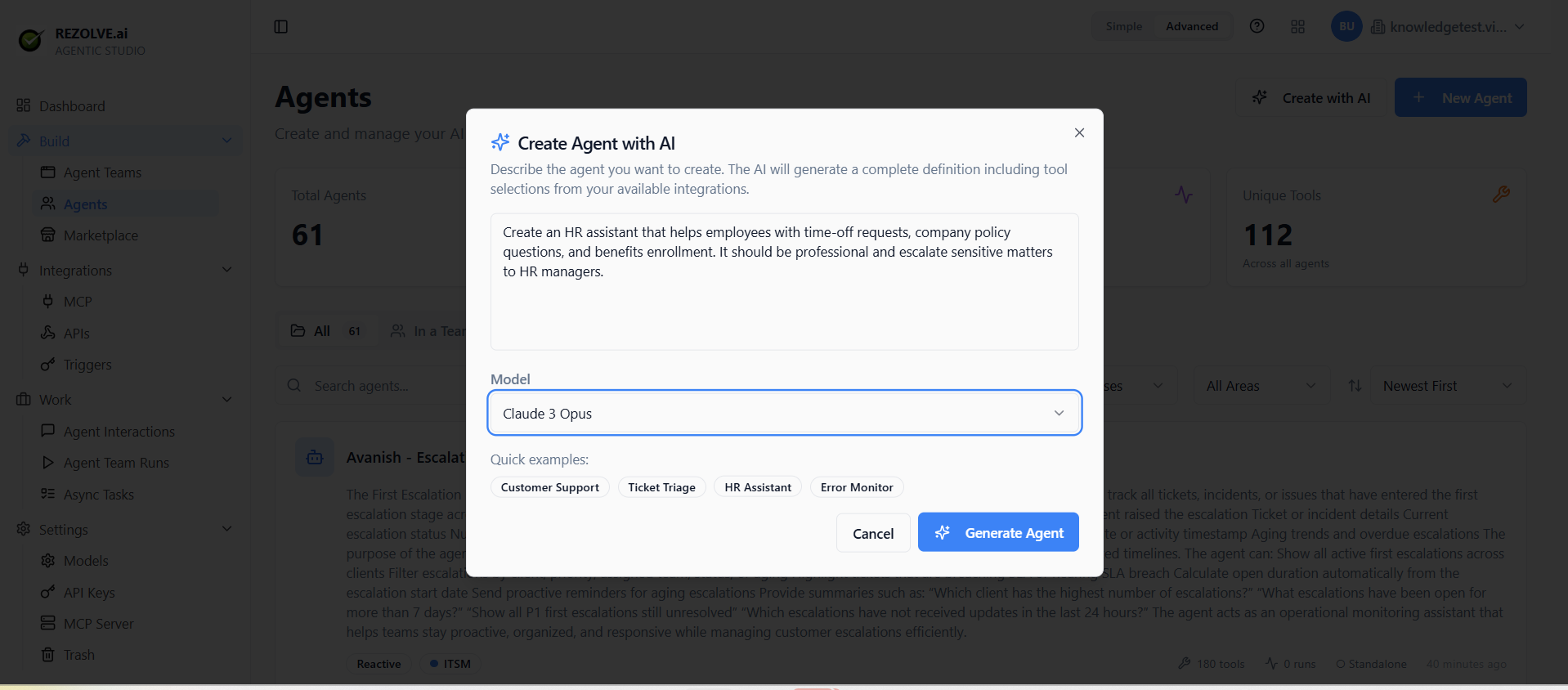
If you'd rather skip the blank-page problem, click Create Agent with AI instead. Describe what you want the agent to do, and the builder generates the configuration — name, purpose, instructions, suggested tools — in one shot. Edit from there.
4. Test it
Click Test on the agent. A chat window opens. Send it a message and watch it respond. If you've attached tools, you'll see when it calls them and what came back.
This is your sandbox. Iterate on the instructions until the responses look right.
5. Share or trigger it
Three ways to put the agent to work:
- Public chat — flip Public on. You get a shareable URL. Anyone with the link can chat with the agent.
- Trigger — set up a Trigger to run the agent on a schedule or in response to a webhook.
- API — call the agent from your own code via the API.