Slots
The slot component lets you capture or display data in a flow without building an adaptive card. Any value entered in a slot becomes a persistent variable with the same name. For example, if you have a slot named "exitFlow" with "Yes" or "Cancel" options, the user's selection is stored as a variable called "exitFlow" containing that string.
Types of slots include:
- Confirm slots
- Choice slots
- Text Slots
- Date slots
- Number Slots
- Attachment Slots
- Time Slots
Confirm Slot
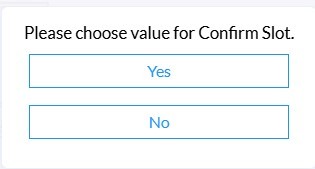
The Confirm Slot presents end-users with a binary Yes/No option. These options can be modified to display whatever label you desire.
Choice Slot
The Choice Slot allows you to present end-users with a variety of choices, defined by you.

Text Slot
The Text Slot allows you to capture text entered by a user. When used as part of a Form Card, users will see a text field. When used standalone in a flow, the flow will pause and wait for user input. Note that there is no visual indication that the bot is waiting for user input when a text slot is used on its own.

Date Slot
The Date Slot presents the user with a calendar view to select a day, month, and year.

Number Slot
The Number Slot works like a text slot but only allows numerical values to be entered. This can be used to request phone numbers, ID numbers, and more.

Time Slot
The Time Slot presents users with a drop-down to enter a specific time.

Attachment Slot
The Attachment Slot allows the user to upload a file attachment to a flow to be used for various applications.