November Release

Release Date: November 29, 2025
Executive Summary
This release marked significant leap forward for the Rezolve AI product with Smart Mailbox and Notification Wall features delivered in product. The Notification Wall provides a centralized hub for managing and viewing all notifications in Agent UI, while Smart Mailbox automatically directs incoming support requests over emails to the appropriate service team queues. Rounding out the release, Asset Management and Agent Studio complete their initial rollout — Asset Management adds Licenses, the CMDB, and RMM/ITSM integrations; Agent Studio adds MCP support, webhook and event triggers, monitoring, and developer access.
Smart Mailbox – AI-Powered Email Routing
Overview
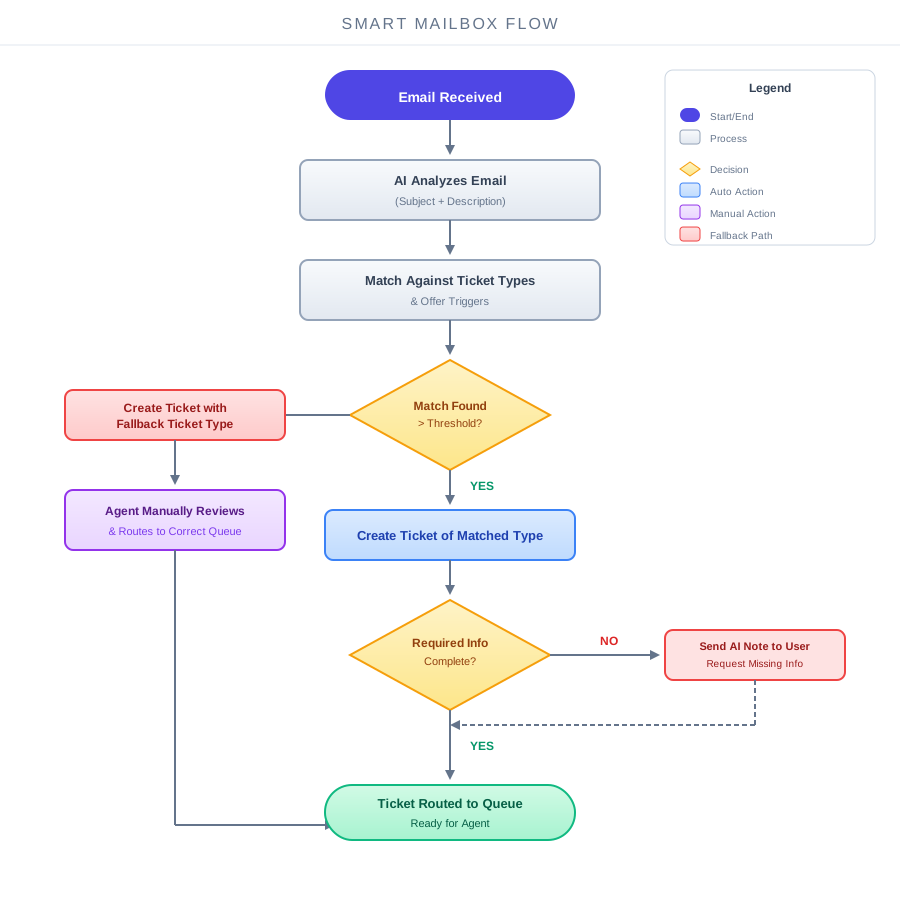
Smart Mailbox is an AI-powered email routing capability that automatically directs incoming support requests over emails to the appropriate service team queues. By intelligently analyzing email content and matching it against your configured ticket types > offer triggers, Smart Mailbox eliminates the manual triage step that traditionally delays ticket resolution.
The Challenge with Traditional Email Ticketing
In conventional ITSM setups, all tickets submitted via email land in a single shared service team queue. A member of the service team must then manually review each ticket, determine its category, and route it to the appropriate queue. This manual triage process introduces delays between when an issue is reported and when it becomes available for an agent to work on - time that could otherwise be spent resolving the issue.
How Smart Mailbox Works
When an email arrives, Smart Mailbox analyzes the email subject and body content, then compares this information against your configured ticket types and offer triggers. Using AI-powered matching, it identifies the most appropriate ticket type for the request. If the match confidence exceeds the configured threshold, Smart Mailbox automatically creates a ticket of that type and routes it directly to the corresponding queue.
This means tickets appear in the right queue from the moment they're created, ready for the appropriate agent to pick up immediately.
Additionally, Smart Mailbox checks whether the created ticket contains all the information an agent needs to work on that specific type of request. If any required details are missing, an AI-generated message is immediately sent to the user requesting that information. This proactive follow-up ensures tickets are fully actionable the moment an agent picks them up, eliminating back-and-forth delays.
Benefits
Smart Mailbox significantly reduces time-to-resolution by eliminating the manual sorting and triaging step entirely. Service teams no longer need to dedicate resources to triaging incoming emails, allowing agents to focus on what matters most - resolving issues. The result is faster response times, improved SLA compliance, and a more efficient service operation overall.
Notification Wall
Overview
We're introducing Notifications Wall, a centralized in-app notification management system that gives agents and service team members complete control over how they receive and manage alerts within Rezolve.ai.
Feature Details
Centralized Notification Center
Access all your notifications from the bell icon in the header. Notifications appear in a scrollable list, making it easy to review recent activity without leaving your current workflow.
-e8a30aa792e8b341a16f436f1537ef41.png)
Read/Unread Management
Mark notifications as read or unread to stay organized. Quickly filter to view only unread notifications so you never miss important updates.
Personalized Notification Preferences
Tenant admins can establish default notification preferences for their organization, ensuring consistent alert settings across the team. Individual agents can then override these defaults to customize notifications based on their preferences and priorities.
Custom Notifications via Events and Actions
Ticket admins can now create custom notifications using the Events and Actions framework. Set up automated alerts based on specific triggers to keep your team informed of critical updates, escalations, or workflow changes.
-d46106baa090e1507d5e85a4b7eded30.png)
Who This Is For
- Agents and Service Team Members: Manage your notifications efficiently and customize your preferences
- Ticket Admins: Configure custom notifications to keep your team informed
- Tenant Admins: Establish organization-wide default notification settings
Hierarchy Label Update Enhancement
Executive Summary
Hierarchy Node Label Editing is now supported for referenced values. Admins can now update the label of a hierarchy node at the global level, even when that node is referenced in existing tickets. Once updated, the new label automatically reflects across all associated tickets.
Key Highlights:
- Edit hierarchy node labels at the global level without restriction
- Automatic label propagation to all referencing tickets
- No manual intervention required for individual ticket updates
Previous Behavior
When attempting to update the label of a hierarchy node that was referenced in existing tickets, the system displayed an error:
"Failed to update the hierarchy data. Cannot remove/edit hierarchy value as it is being referred in X tickets"
This prevented admins from making necessary label corrections or updates without first removing references from all affected tickets.
New Behavior
- Admins can now edit hierarchy node labels at the global level without restriction
- Label updates propagate automatically to all tickets referencing that hierarchy node
- No manual intervention required to update individual ticket records
Impact
This enhancement streamlines hierarchy management by eliminating the need to manually update or unlink tickets before making label changes. It ensures data consistency across the system while giving admins greater flexibility to maintain accurate and up-to-date hierarchy labels.
Configurable Minor Data Grouping in Dashboard Charts
Users now have control over how minor data points are displayed in dashboard charts. Previously, all values contributing less than 3% of the dataset were automatically grouped into an "Other (less than 3%)" category, which could reduce clarity.
What's New
- A new toggle option "Club minor data (less than 3%) in 'Other'" has been added to Pie, Donut, and Bar charts
- The toggle is OFF by default, displaying all categories individually for full visibility
- When enabled, values under 3% are dynamically grouped into "Other" to simplify chart readability
Asset Management — Licenses, CMDB, and Integrations
Overview
The November release completes the Asset Management rollout. Hardware tracking went live in September, customisation and reporting followed in October, and this month rounds it out with software license management, a configuration-management database, and integrations to bring data in automatically from the tools your team already runs.
License Management
Track every paid software license in one place — Adobe, Microsoft, Atlassian, anything. Each license has a name, manufacturer, type (Per-Seat, Concurrent, Site, Other), total seats, expiration date, and purchase metadata. Assign seats to specific users (resolved live from your directory) or to specific assets (for software bound to hardware). Each checkout and check-in is logged with a full audit trail.
The license dashboard surfaces what matters: licenses expiring in the next 30 days, totals used vs. available, spend by manufacturer. Combined with the alert engine from October, you can wire automatic notifications for renewals before they sneak up. See Licenses.
Configuration Management Database (CMDB)
Asset Management now supports more than physical assets. The CMDB tracks the things in your IT environment that need governance — servers, applications, services, databases — and the relationships between them. Each configuration item carries status (Planned / Active / Degraded / Retired), environment (Prod / Stage / Test / Dev), and criticality (Low through Critical). Relationship types are configurable per tenant, so you can model depends on, runs on, connects to, or whatever your team uses.
Discovery sources push candidate CIs into a pending queue for human review before they enter the live CMDB — nothing appears without explicit approval. See CMDB.
RMM Integrations
Twelve RMM platforms supported out of the box: Tactical RMM, MeshCentral, ConnectWise Automate, Datto RMM, NinjaOne, Syncro, Atera, N-able N-central, N-able RMM, Pulseway, Level.io, and Addigy. Each integration follows the same flow — connect with API credentials, sync devices, review the candidates in a pending queue, then approve into your inventory or merge with an existing asset. Sync runs manually or on a schedule. See RMM Integrations.
ITSM Integrations
Nine ITSM platforms supported: ConnectWise Manage, Autotask, Freshservice, ServiceNow, Zendesk, Jira, Rezolve.ai, HaloPSA, plus a Generic / Custom option for any tool that can post a webhook. Each ITSM integration generates a unique webhook URL that auto-matches incoming tickets to the right asset or CI by serial number, asset tag, hostname, or CI name. Tickets show up on the asset's record; clicking through opens the ticket in your ITSM. See ITSM Integrations.
Benefits
The Asset Management module is now feature-complete for v1. You can replace your inventory spreadsheet, your license-tracker, your CMDB sketch in Visio, and the manual triage between your RMM and your ticket queue — with one tool that connects all of them.
Agent Studio — Observability, MCP, and Developer Access
Overview
Agent Studio's November release closes out the v1 surface area. The September MVP let you build and ship a single agent. October added composition (Apps, Marketplace, scheduled triggers, API tools). This month adds the things you need once agents are running in production: full-protocol MCP support, webhook and event-driven triggers, end-to-end monitoring, and developer access for embedding Agent Studio in your own systems.
MCP Integrations (Full Protocol)
Model Context Protocol is the open standard for connecting LLMs to tools. Agent Studio now supports MCP as a first-class integration — connect to any MCP server with HTTP, WebSocket, or stdio transport, with API key, OAuth, or no auth. Tools auto-discover when you connect; if a server adds new tools later, refresh the integration and they appear. Tools can mix freely across servers — an agent can use 3 tools from your CRM's MCP server, 2 from your knowledge base's, and 1 system tool, all in one agent. See MCP Integrations.
Webhook and Event-Driven Triggers
October added scheduled triggers. November adds the other two trigger types. Webhook triggers give each trigger a unique URL that anything can POST to — Zapier, n8n, GitHub Actions, your own backend. The POST body becomes the input to the agent, shaped via a configurable input template. Event triggers run an agent in response to something inside Agent Studio: a new task in the backlog, an app run completing, another agent finishing — letting you build pipelines without external orchestration. See Triggers.
Monitoring
Three new views surface what your agents actually do. Agent Interactions shows every conversation an agent has had — public chats, triggered runs, API calls, app calls — with the full transcript, every tool call, token usage, and outcome. Task Backlog shows queue-driven agents at work: tasks waiting, in progress, finished today. App Runs shows multi-agent app executions with the full topology, timing per agent, and the user-facing output. All three support filtering, search, and CSV export. See Monitoring.
Developer Access
A REST API exposes every agent and published app for programmatic use. API keys (with scopes, expiration, and per-key rate limits) authenticate calls. The platform can also act as an MCP server — exposing your agents to other MCP clients like Claude Desktop or Cursor as tools. OAuth is supported for third-party apps that need to authenticate Agent Studio users. Outgoing webhooks can POST signed payloads when agents finish or errors fire. See Developer Access.
Cost Guard Rails
Spend caps now apply per model and per tenant. When the cap is reached, agents using that model pause until you raise the limit or switch models — protecting against runaway costs from a misbehaving agent or a webhook that fires too often.
Benefits
With November shipped, Agent Studio v1 is complete. You can build agents, compose them into apps, run them on triggers, watch what they do in production, and integrate them into your own systems via API or MCP. The module is ready for production workloads, not just experimentation.
Support
For questions or issues related to this release, please contact our support team by emailing us at support@rezolve.ai